Buying guide
Atomos Ninja vs Shinobi: Ninja TX, TX GO or Shinobi II
The Shinobi II is a monitor, the Ninja TX and TX GO are monitor-recorders. Compare codecs, ProRes RAW, SDI, brightness, power and media, and find out whether you need an external recorder.
Short answer In the Atomos Ninja vs Shinobi choice, the Shinobi II is a monitor only, while the Ninja TX and Ninja TX GO are monitor-recorders that also capture ProRes, ProRes RAW, DNx and H.265 to a card or drive. All three have 1500-nit screens. Pick the Shinobi II if you only need a bigger, brighter view, the TX GO for HDMI recording, and the TX if you also need SDI.
All three are 5-inch class Atomos screens that mount on a camera, so they look alike in photos. The difference is what happens to the signal after it reaches the screen. This guide compares them on recording, codecs, inputs, brightness, power and media, and explains which cameras send RAW over HDMI. You can compare all current models in our on-camera monitors range.
Monitor vs monitor-recorder
A monitor shows the camera's HDMI feed on a larger, brighter screen than the camera's own display, with tools for checking focus and exposure. It does not store anything.
A monitor-recorder does the same job and also records the incoming signal to its own media. That lets you capture in a different codec from the one the camera records internally, including ProRes RAW from cameras that output RAW over HDMI. It also gives you a second copy of the take, and a file format that many editing systems handle more easily than long-GOP camera files.
The trade-off is size, weight, power draw and media cost. If you never plan to record externally, a recorder's extra hardware is weight you carry for nothing.
Atomos Ninja vs Shinobi II: the three side by side
The specifications below come from Atomos's product and tech-spec pages.
| Feature | Shinobi II | Ninja TX GO | Ninja TX |
|---|---|---|---|
| Role | Monitor only | Monitor-recorder | Monitor-recorder |
| Screen | 5-inch class, 1920 x 1080 | 5.2-inch, 1920 x 1080 | 5.2-inch |
| Brightness | 1500 nits | 1500 nits | 1500 nits |
| Video connections | HDMI input | HDMI 2.0 in and out | HDMI 2.0 and 12G-SDI in and out |
| Recording | None | ProRes, ProRes RAW, DNx, H.265/H.264 | ProRes, ProRes RAW, DNx/DNxHR, H.265/H.264 |
| Media | None | CFexpress Type B or USB-C drive | CFexpress Type B or USB-C drive |
| Wireless | Wi-Fi not listed | Wi-Fi 6E | Wi-Fi 6E, camera-to-cloud |
| Power | NP-F, USB-C PD or DC dummy battery | NP-F or 30 W USB-C PD | NP-F slot |
The three Atomos screens compared
-
 Atomos
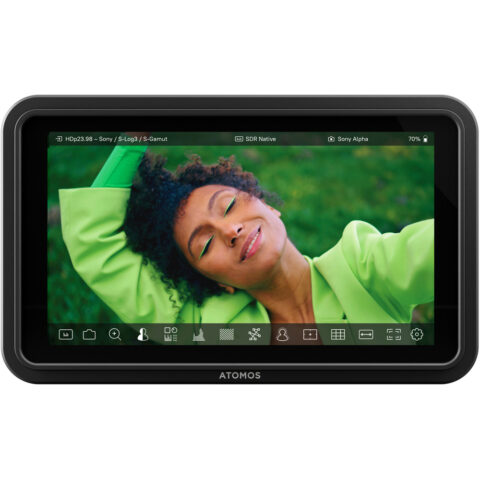
Atomos Shinobi II 5" Monitor
$546.95 incl. GST Ships in 1-2 business daysAdd to cart -
 Atomos
Atomos Ninja TX GO 5.2" HDMI Wi-Fi-Enabled Camera Monitor/Recorder
$1,201.95 incl. GST Ships in 2-3 business daysAdd to cart -
 Atomos
Atomos Ninja TX 5.2" Camera to Cloud Monitor/Recorder
$1,604.95 incl. GST Ships in 2-3 business daysAdd to cart
Shinobi II
The Shinobi II is the lightest of the three, at about 210 g according to Atomos, and it has no recording hardware. It accepts power from an NP-F battery, USB-C PD or a DC dummy battery, with an input range of 6.2 to 16.8 V. It suits photographers moving into video, gimbal shooters who want a bigger screen without extra weight, and anyone whose camera already records the files they need.
Ninja TX GO
The TX GO is the HDMI-only Ninja. Atomos lists ProRes RAW recording up to 6Kp30 from compatible cameras, plus ProRes, DNx and H.265/H.264. It has Wi-Fi 6E and takes power from an NP-F battery or 30 W USB-C PD. For most mirrorless and compact cinema cameras, which output HDMI only, this is the recorder that covers every connection the camera has.
Ninja TX
The Ninja TX adds 12G-SDI input and output alongside HDMI 2.0, and Atomos promotes it as a camera-to-cloud recorder. SDI matters if your camera has an SDI port, or if you want a locking BNC connection to a larger monitor, a wireless transmitter or a switcher downstream. If none of your gear has SDI, the TX GO records the same codec families over HDMI.
Which one suits which shooter
- Hybrid photographers and gimbal users who want easier framing and focus checking: Shinobi II.
- Mirrorless and FX-series shooters who want a ProRes RAW recorder over HDMI, or an edit-friendly ProRes copy: Ninja TX GO.
- Crews with SDI cameras, or who feed SDI monitors, wireless transmitters or switchers from the camera position: Ninja TX.
- Shooters who are unsure: start by checking whether your camera outputs RAW over HDMI. If it does not, and its internal files already edit well on your computer, the Shinobi II may be all you need.
Keep storage in mind with any recorder. ProRes and ProRes RAW files are far larger than the compressed files most mirrorless cameras record internally, so plan for more card or drive capacity and a faster computer workflow than you use now.
Do I need an external recorder?
You probably need a recorder if any of these apply:
- You want RAW from a camera that only outputs it over HDMI. Several Sony bodies record compressed video internally but send RAW to an external device.
- You want an edit-friendly codec. ProRes and DNx files are larger than long-GOP camera files but are easier for many editing computers to play back.
- You want a backup take. Recording in camera and on the Ninja at once protects against a card failure.
You probably do not need one if your camera's internal codec already suits your edit, if you shoot short clips for social media, or if weight on a gimbal matters more than codec choice. In those cases the Shinobi II gives you the larger, brighter screen for less weight and power.
Cameras that send RAW over HDMI
A ProRes RAW recorder only records RAW if the camera sends it. Atomos's compatible-camera pages list ProRes RAW over HDMI for bodies including:
- Sony FX3, FX30, a7S III and Alpha 1
- Canon EOS R5 C
- Nikon Z6 III
Resolutions, frame rates and firmware requirements differ by camera, so check your body on Atomos's compatible-cameras page before you buy for RAW. If your camera is not on that list, a Ninja still records its normal HDMI signal to ProRes, DNx or H.265.
Camera monitor brightness in nits
Nits measure how bright a screen can get. Many camera rear screens are hard to read in direct Australian sun, which is where a high-brightness monitor earns its place. All three Atomos models here are rated at 1500 nits, so brightness is not a reason to choose one over another.
Higher brightness uses more power, so expect shorter battery life when you run the screen at full output outdoors. A hood helps as much as extra nits in hard light. Atomos makes a sunhood for the Shinobi II, and there are more options in monitor hoods.
Power, media and mounting
Power
All three take NP-F batteries, the common choice for 5-inch monitors. The Shinobi II and Ninja TX GO also take USB-C PD, which means a power bank or a V-mount battery with USB-C output can run them. For rigs with one central battery, our guide to V-mount batteries covers D-Tap, USB-C PD and runtime maths. NP-F packs are in the Sony NP-F range.
Recording media
Atomos lists two media options for both Ninja models: CFexpress Type B cards or an external drive over USB-C. Cards keep the rig compact. A USB-C drive gives you more room for long ProRes takes, at the cost of a cable and a mount. Our comparison of CFexpress Type A vs Type B vs SD explains card types and speeds.
Cables and mounting
The HDMI cable is the weakest link in any monitor setup. Check whether your camera has full-size or micro-HDMI, keep the cable short and clamp it at the camera end. Our camera video cable guide covers connector types and cable clamps. A monitor cage adds protection and mounting points to the screen itself.
Accessories for Atomos 5-inch screens
-
 SmallRig
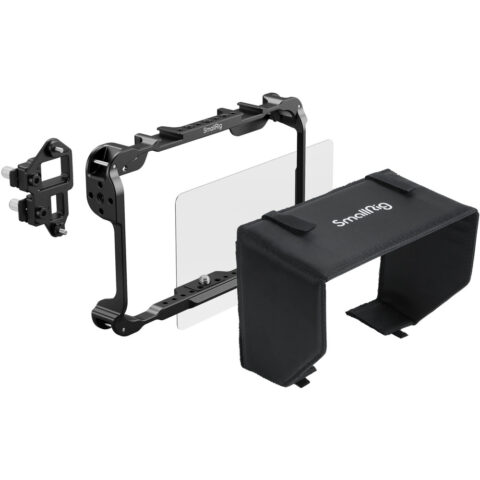
SmallRig 5030 Monitor Cage Kit for Atomos Shinobi II
$133.95 incl. GST Ships in 1-2 business daysAdd to cart -
 Atomos
Atomos Sunhood for Shinobi II
$88.95 incl. GST Ships in 1-2 business daysAdd to cart -
 Atomos
Atomos 4K60 HDR Locking Full HDMI to Micro-HDMI High-Speed Cable (30cm)
$71.95 incl. GST Ships in 2-3 business daysAdd to cart -
 SmallRig
SmallRig 4469 NP-F970 USB-C Rechargeable Camera Battery (Black)
$120.95 incl. GST Ships in 1-2 business daysAdd to cart
If you need a larger screen or SDI on a monitor only, browse production monitors or the full Atomos range.
Questions
Atomos Ninja TX vs TX GO: what is the real difference?
SDI and camera-to-cloud positioning. Both have a 5.2-inch, 1500-nit screen, record ProRes, ProRes RAW, DNx and H.265, and use CFexpress Type B or USB-C drives. The Ninja TX adds 12G-SDI input and output. If your camera and downstream gear are HDMI only, the TX GO covers the same recording formats.
Can the Shinobi II record video?
No. The Shinobi II is a monitor only, with no recording media. It shows the camera's HDMI feed on a brighter 1500-nit screen with exposure and focus tools. If you later want to record ProRes or ProRes RAW externally, you need a Ninja model or another monitor-recorder.
Is ProRes RAW an extra cost on the Ninja TX GO?
Atomos states that ProRes RAW and ProRes RAW HQ come pre-activated on its Ninja models, along with ProRes and H.265. Your camera still has to output RAW over HDMI for the Ninja to record it, so check your camera on the Atomos compatibility list.
Which one suits a Sony FX3 or FX30?
Both cameras have full-size HDMI and appear on Atomos's ProRes RAW list, so a Ninja TX GO covers RAW recording over HDMI. Choose the Ninja TX if you also need SDI for other equipment, or the Shinobi II if you only want a bigger screen and prefer the camera's internal recording.
Sources
Specifications and background were checked against these pages when the guide was last updated. Always confirm compatibility on the product page before ordering.
- atomos.com/tech-specs/ninja-tx
- atomos.com/product/ninja-tx-5-monitor-recorder
- atomos.com/tech-specs/ninja-tx-go
- atomos.com/2025/11/05/atomos-launches-ninja-tx-go
- atomos.com/tech-specs/shinobi-ii
- atomos.com/explore/shinobi-series
- atomos.com/compatible-cameras
- atomos.com/compatible-cameras/fx30
- atomos.com/compatible-cameras/a7s-iii
- atomos.com/compatible-cameras/eos-r5-c