Buying guide
How to Set Up a Podcast at Home for One, Two or Four People
Three reference podcast setups for one, two and four people, with the microphones, consoles, headphones and room treatment each needs, plus how to handle remote guests.
Short answer To set up a podcast at home, give every speaker their own close-placed dynamic microphone, a boom arm and closed-back headphones, then record each microphone to its own track. One person can plug a USB microphone straight into a computer. Two people need a two-input interface or a console such as the RODECaster Duo, and four people need a four-input console such as the RODECaster Pro II. A rug and soft furnishings do more for the sound than any upgrade.
Working out how to set up a podcast at home is mostly a question of headcount. Each extra voice adds a microphone, an arm, a pair of headphones and an input, and at some point a USB microphone stops being practical. Below are three reference setups for one, two and four people, built from gear in our streaming and podcasting and audio ranges, followed by the room, recording and remote-guest details that apply to all of them.
Whatever the size of the show, the recording path is the same four steps:
- Microphone: one per speaker, placed close to the mouth.
- Preamp and converter: inside a USB microphone, or in an interface or podcast console for XLR microphones. This is where you set each person's level.
- Recorder: software on a computer, or a microSD card in a console or recorder that supports it.
- Monitoring: headphones for every speaker, fed from the microphone, interface or console.
Before the first real episode, record a few minutes of normal conversation, listen back on headphones and adjust levels so the loudest laughs stay clear of clipping.
Setup 1: one person
A solo show can skip the interface altogether.
- Microphone: the RODE PodMic USB. It is a dynamic broadcast microphone with USB-C for a direct computer connection and an XLR output for later. RODE lists an internal Revolution Preamp, onboard APHEX processing and a headphone output.
- Arm: a RODE PSA1 boom arm, which keeps the microphone at a steady distance and off the desk.
- Headphones: closed-back, such as the Sony MDR-7506, plugged into the microphone so you hear yourself as you record.
If a guest occasionally joins you in the room, the Shure MV7i is an alternative. It has a second input for another microphone and works as a small two-channel USB interface.
Solo podcast setup
-
 RODE
RODERode PodMic USB Microphone
$275.95 incl. GST Ships in 1-2 business daysAdd to cart -
 RODE
RODERode PSA1 Studio Boom Arm for Broadcast Microphones
$133.95 incl. GST Ships in 1-2 business daysAdd to cart -
 Sony
SonySony MDR-7506 Circumaural Closed-Back Professional Monitor Headphones
$172.95 incl. GST Ships in 4-6 weeksAdd to cart -
 Shure
ShureShure MV7i Smart Microphone and Interface
$566.95 incl. GST Ships in 1-2 business daysAdd to cart
Setup 2: how to record a podcast with two mics
Two people should not rely on two USB microphones. Each has its own clock, so over a long episode the tracks can drift out of sync. Instead, run two XLR microphones into one device so both share a clock and land on separate tracks.
The console route
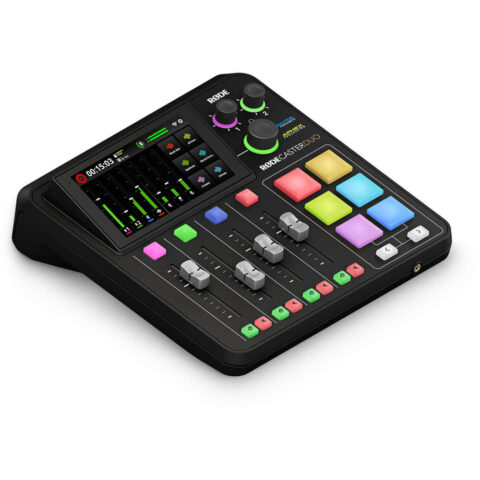
- Console: RODECaster Duo, with two combo inputs, up to 76 dB of gain per input and two headphone outputs, so each host sets their own level.
- Microphones: two RODE PodMic dynamics. They are passive, so they need no phantom power, and the Duo has ample gain for them.
- Arms and headphones: one arm and one pair of closed-back headphones per person, such as the RODE NTH-100.
- Cables: two XLR cables from the mic and XLR cables range.
RODE also sells this as a kit. The RODECaster Two-Person Podcasting Bundle is listed by RODE with a RODECaster Duo, two PodMics, two PSA1+ arms, two NTH-100 headphones and two XLR cables. Check the product page for the exact contents of the version we stock.
The interface route
A two-input interface such as the Focusrite Scarlett 2i2 4th Gen, with up to 69 dB of gain, also works. The catch is that most two-input interfaces have a single headphone output, so both hosts share one level through a splitter. Read do you need an audio interface for how to weigh that up.
Two-person podcast setup
-
 RODE
RODERode RODECaster Duo Compact Mixer
$677.95 incl. GST Ships in 1-2 business daysAdd to cart -
 RODE
RODERode PodMic Dynamic Podcasting Microphone
$129.95 incl. GST Ships in 1-2 business daysAdd to cart -
 RODE
RODERode NTH-100 Professional Closed-Back Over-Ear Headphones (Black)
$207.95 incl. GST Ships in 1-2 business daysAdd to cart -
 RODE
RODERODE RODECaster Two-Person Podcasting Bundle
$1,986.95 incl. GST Ships in 2-4 weeksAdd to cart
Setup 3: four people
Four voices call for four inputs, four headphone outputs and a way to balance everyone on the fly.
- Console: RODECaster Pro II, with four combo inputs, the same up to 76 dB Revolution Preamps and four headphone outputs.
- Microphones: four matching dynamics, such as the RODE PodMic, so every voice has the same character.
- Arms and headphones: four of each. Clamp the arms so each microphone sits at the same distance from each speaker.
With four people around one table, spill between microphones becomes the main problem. Seat people so the back of each cardioid microphone points towards the other speakers where possible, keep everyone close to their own microphone, and use the same gain for matching voices as a starting point.
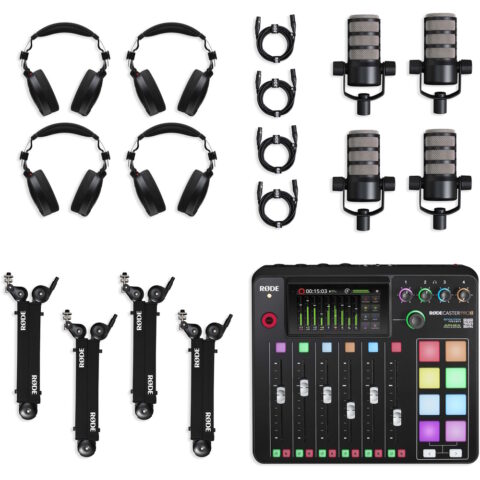
RODE's Four-Person Podcasting Bundle pairs a RODECaster Pro II with four PodMics, four PSA1+ arms, four NTH-100 headphones and four XLR cables, according to RODE's listing.
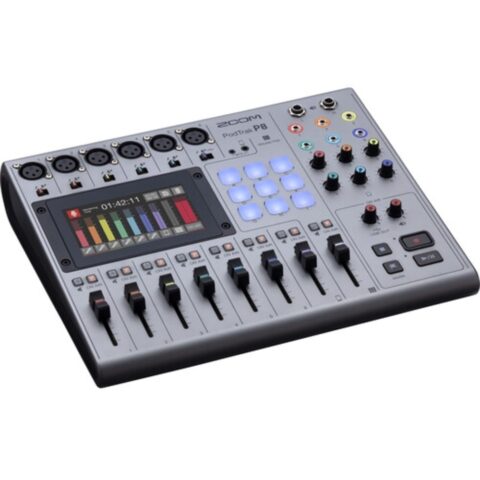
The Zoom PodTrak P8 is the other option at this size. Zoom lists six XLR inputs with up to 70 dB of gain, six channel faders, nine sound pads and a phone-interview channel with automatic mix-minus.
Four-person podcast setup
-
 RODE
RODERode RODECaster Pro II Integrated Podcast Production Studio
$850.95 incl. GST Ships in 1-2 business daysAdd to cart -
 RODE
RODERODE RODECaster Four-Person Podcasting Bundle
$3,528.95 incl. GST Ships in 2-4 weeksAdd to cart -
 Zoom
ZoomZoom PodTrak P8 Portable Multitrack Podcast Recorder
$744.95 incl. GST Ships in 2-3 business daysAdd to cart
RODECaster Duo vs Pro II
| Feature | RODECaster Duo | RODECaster Pro II |
|---|---|---|
| Combo inputs | 2 | 4 |
| Preamp gain | Up to 76 dB | Up to 76 dB |
| Headphone outputs | 2 | 4 |
| Physical faders | 4 | 6 |
| SMART pads | 6 | 8 |
| USB-C audio interfaces | 2 | 2 |
| Built-in wireless receiver | Yes, for up to two RODE Series IV transmitters | Yes, for up to two RODE Series IV transmitters |
| Bluetooth | Yes | Yes |
| Multitrack recording to microSD | Yes | Yes |
Both share the same preamps, wireless and recording features, so the choice comes down to seats. The Duo suits one or two hosts, plus up to two wireless transmitters or a phone guest. The Pro II suits three or four people in the room. Browse more consoles in small format mixers.
How to set up a podcast at home: room and recording habits
Treat the room first
- Soft furnishings: a couch, curtains, cushions and full bookshelves reduce reflections.
- A rug on hard floors, especially between speakers.
- Absorption panels at the first reflection points on side walls and behind each speaker. Thicker broadband panels work better than thin foam, which mainly absorbs high frequencies. See the acoustic treatment range.
- Avoid bare corners and the exact centre of a small room, which can make voices boomy or uneven.
Microphone technique
Keep each speaker about 5 to 10 cm from their microphone, with a pop filter if needed, and hold that distance for the whole episode. Point the back of each cardioid microphone towards the noisiest thing in the room. Our podcast microphone guide covers placement in more detail.
Record separate tracks
Record every microphone to its own track, not just a stereo mix. Separate tracks let you lower one person's cough, fix levels and apply noise reduction to one voice without touching the others. Keep a stereo mix too as a safety copy.
Headphones for everyone
Monitoring on speakers while recording lets sound bleed into the microphones. Give each person closed-back headphones, from the over-ear headphones range.
Remote guests
For a guest on a video call, send them a mix-minus feed: everything they need to hear, minus their own voice, so they do not hear an echo of themselves. Record their incoming audio on its own track. Both RODECasters have two USB-C interfaces, so one computer can run the call while another records, and the P8 has a dedicated phone channel with automatic mix-minus. Test the routing with a short call before every interview.
Questions
What podcast equipment do I need in Australia to start?
At minimum, a microphone for each speaker, something to record into, headphones and a reasonably quiet room. A solo host can start with a USB dynamic microphone, an arm and closed-back headphones. Once you add a co-host, move to XLR microphones and an interface or console so both voices record on separate tracks with a shared clock.
Is the RODECaster Duo enough for two people?
Yes. It has two combo inputs with up to 76 dB of gain each and two headphone outputs, so each host gets their own microphone and headphone level. Its built-in wireless receiver and Bluetooth also let you add wireless microphones or a phone guest without taking up the two XLR inputs.
Do I need acoustic panels for a home podcast?
Not always. Close-placed dynamic microphones, a rug and soft furnishings solve a lot. If you still hear echo or a hollow sound on test recordings, broadband absorption panels at the first reflection points and behind the speakers are the next step. Thin foam alone mostly affects high frequencies and often leaves the room sounding boxy.
How do I record a remote guest without echo?
Use a mix-minus feed, which sends the guest everything except their own voice. Consoles such as the RODECaster Duo and Pro II make this easier with two USB-C interfaces, and the Zoom PodTrak P8 has a phone channel with automatic mix-minus. Ask the guest to wear headphones so your voice does not feed back into their microphone.
Sources
Specifications and background were checked against these pages when the guide was last updated. Always confirm compatibility on the product page before ordering.
- rode.com/en-us/products/rodecaster-duo?variant_sku=RCDUO
- rode.com/en-us/products/rodecaster-pro-ii
- help.rode.com/hc/en-us/articles/6938577981583-What-are-the-R%C3%98DECaster-Pro-II-Duo-s-Revolution-Preamps
- rode.com/en-us/solutions/podcast
- rode.com/en-us/products/podmic-usb
- zoomcorp.com/en/us/podtrak-recorders/podcast-recorders/podtrak-p8
- shure.com/nl-NL/producten/microfoons/mv7i
- us.focusrite.com/scarlett