Buying guide
Wireless microphone frequencies in Australia: 2.4 GHz vs UHF
What ACMA's class licence allows, why 694 to 820 MHz is off limits, how 2.4 GHz creator systems differ from UHF stage systems, and how to plan channels and avoid interference.
Short answer Yes, wireless microphones are legal in Australia without an individual licence if the equipment complies with ACMA's low interference potential devices (LIPD) class licence and stays within its bands. Creator systems use the shared 2.4 GHz band, while UHF stage systems use unused TV channels between 520 and 694 MHz. The 694 to 820 MHz range has been off limits to wireless mics since 1 January 2015, so older gear tuned there should not be used.
Wireless microphone frequencies in Australia are set by the Australian Communications and Media Authority (ACMA). Most shoppers never need to think about it, because the clip-on kits used for video run on 2.4 GHz and set themselves up. It matters when you buy a UHF system for a church, school, theatre or band, buy second-hand or imported gear, or run several systems at one event.
This guide covers the rules, how 2.4 GHz and UHF systems differ, and how to plan channels and avoid interference. You can browse our full wireless microphones range as you read.
Are wireless microphones legal in Australia?
Yes. ACMA's LIPD class licence authorises wireless microphones in set frequency bands. The Radiocommunications (Low Interference Potential Devices) Class Licence 2015 was remade as the 2025 class licence, which commenced on 1 October 2025. A class licence is a standing authorisation, so you do not register your microphone or pay an individual fee, provided the equipment and its use meet the licence conditions.
Two conditions shape everything else:
- No protection. Class-licensed users share the spectrum. You have no right to a clear channel, and other devices may interfere with you.
- Do not cause interference. In the UHF TV band, ACMA's guidance for wireless audio devices says the key condition is that you must not interfere with broadcast television reception.
Wireless microphones outside the class licence bands need an apparatus licence, which carries fees. That applies mainly to broadcasters and large productions, not to everyday buyers. ACMA's wireless microphones page is the authoritative reference.
Wireless microphone frequencies in Australia: the ACMA bands
ACMA notes that the lower limit of each band is always excluded. These are the ranges most relevant to buyers:
| Range | Who else uses it | What it means for you |
|---|---|---|
| 520 to 694 MHz (UHF) | Television broadcasting is the main user | Use only frequencies not used by TV in your area. 520 to 526 MHz is available in all areas. Limit of 100 mW EIRP. |
| Just below 1800 MHz (1.8 GHz) | Reserved for wireless microphones and other audio transmitters | Available in all areas. |
| 2400 to 2483.5 MHz (2.4 GHz) | Wi-Fi, Bluetooth and many other devices | Where most creator systems operate. |
| 5725 to 5875 MHz (5.8 GHz) | Shared with other devices | Used by some newer creator systems alongside 2.4 GHz. |
| 694 to 820 MHz | Mobile broadband (4G) | Not available for wireless microphones since 1 January 2015. |
ACMA's online Channel Finder shows which UHF frequencies are free of TV services in your area. Because TV channel use varies from place to place, a UHF system that works cleanly in one city may need retuning in another.
The 694 to 820 MHz change
The 694 to 820 MHz band was cleared as part of the digital dividend. Television services were restacked into lower UHF spectrum, and the freed band was allocated for mobile broadband through the 700 MHz spectrum auction. Wireless microphones had to stop using it by 31 December 2014. Before the deadline, ACMA required warning labels on equipment that could tune into the affected range.
What this means today:
- Older UHF systems that tune only above 694 MHz should not be used in Australia.
- Systems that tune across the boundary should be set to frequencies below 694 MHz.
- Second-hand and imported systems need checking. Frequency band codes differ by country, and a system built for another market may sit in a range that is not available here.
Is 520 to 694 MHz safe long term?
For now, yes. ACMA's five-year spectrum outlook work has kept the 600 MHz band under monitoring, with any future replanning dependent on government media policy and further consultation. ACMA has said wireless microphones would need to be considered in any such program. The 2025 class licence also added arrangements for wireless multichannel audio systems in this range.
UHF vs 2.4 GHz wireless microphones
The choice between UHF and 2.4 GHz is less about sound quality and more about scale, control and the venue.
2.4 GHz creator systems
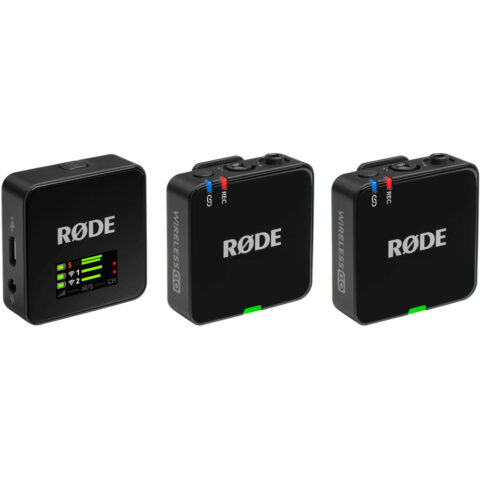
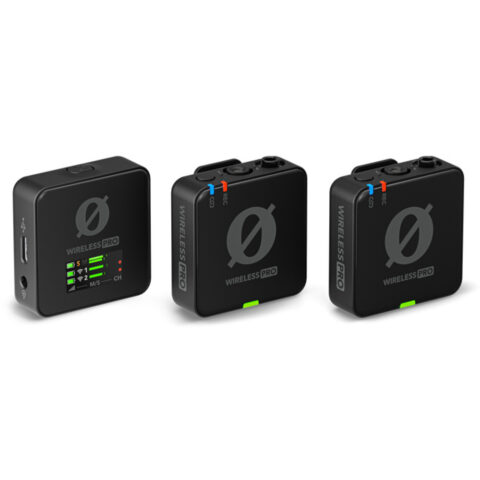
Kits like the RODE Wireless GO, DJI Mic 3 and Hollyland Lark range use digital transmission in the 2.4 GHz band, and the DJI Mic 3 can also hop to 5.8 GHz. They pair automatically and run on built-in rechargeable batteries. RODE quotes up to 260 m line of sight for the Wireless GO (Gen 3), and DJI up to 400 m for the Mic 3. The limits are channel count and a band shared with every Wi-Fi router and phone in the room. Our comparison of the DJI Mic 3, RODE Wireless PRO and Lark Max 2 covers the flagship kits.
UHF stage systems
UHF systems such as the Shure BLX, Sennheiser XSW and Sennheiser evolution wireless Digital put each transmitter on its own frequency. Shure specifies up to 12 compatible BLX systems per frequency band, a 91 m line of sight range, and up to 14 hours from two AA batteries. Shure lists two Australian BLX bands, K14 (614 to 638 MHz) and M17 (662 to 686 MHz). UHF suits churches, schools, theatre and live music because handheld and headset mics are standard, channels can be planned, and the signal is not competing with Wi-Fi.
| Factor | 2.4 GHz creator systems | UHF systems |
|---|---|---|
| Setup | Automatic pairing | Choose frequencies, often with a scan function |
| Channels at once | Usually the transmitters one receiver supports | Many, with frequency coordination |
| Main interference risk | Wi-Fi, Bluetooth, crowds of phones | TV channels, other UHF systems, intermodulation |
| Mic styles | Clip-on transmitters, lavaliers | Handheld, bodypack with lav or headset |
| Power | Built-in rechargeable batteries | AA batteries or rechargeable packs |
| Suits | Video, interviews, social content | Stage, worship, education, events |
UHF systems for Australian bands
-
 Shure
ShureShure BLX288/SM58 Dual-Transmitter Handheld Wireless System with SM58 Mics (M17: 662 - 686 MHz)
$1,443.95 incl. GST Ships in 4-6 weeksAdd to cart -
 Sennheiser
Sennheiser XSW 1-825 Dual-Vocal Set with Two 825 Handheld Microphones (A: 548 - 572 MHz)
$1,006.95 incl. GST Ships in 2-3 business daysAdd to cart -
 Sennheiser
Sennheiser EW-D 835-S Handheld Set (R1-6: 520 - 576 MHz)
$977.95 incl. GST Ships in 2-3 business daysAdd to cart
Each of these tunes within the 520 to 694 MHz range, and the band is printed in the product name: Shure M17 covers 662 to 686 MHz, Sennheiser A covers 548 to 572 MHz, and Sennheiser R1-6 covers 520 to 576 MHz. See more from Shure and Sennheiser.
Channel planning and wireless mic interference
For UHF systems
- Check your area. Use ACMA's Channel Finder to see which TV channels are active where you will perform.
- Scan at the venue. Many UHF receivers can scan for clear frequencies. Scan with the venue's other gear switched on.
- Use the maker's frequency groups. Systems in the same group are chosen to avoid intermodulation, where two transmitters combine to create interference on a third frequency.
- Keep line of sight. Mount receivers where the antennas can see the stage, off the floor and away from metal racks.
- Label everything. Note each transmitter's frequency so you can move one quickly if a problem appears.
For 2.4 GHz systems
- Keep receivers away from Wi-Fi routers and streaming boxes.
- Keep transmitters facing the receiver where possible. A body between them absorbs signal.
- Test with the room full. A hall with hundreds of phones behaves differently from an empty one.
- Use on-board recording, where your kit has it, as a backup against dropouts.
For more channels, antennas and spares, see our wireless mic accessories and complete wireless systems.
2.4 GHz creator systems
-
 RODE
RODERODE Wireless GO Compact Wireless Microphone System (Gen 3)
$265.95 incl. GST Ships in 1-2 business daysAdd to cart -
 DJI
DJIDJI Mic 3 Wireless Microphone (2 TX + 1 RX + Charging Case)
$450.95 incl. GST Ships in 1-2 business daysAdd to cart -
 RODE
RODERODE Wireless PRO Compact Wireless Microphone System
$382.95 incl. GST Ships in 1-2 business daysAdd to cart
If you film mostly on a phone, read our guide to wireless mics for iPhone and Android. Prices include GST, shipping is free Australia-wide, and each product page shows its dispatch time.
Questions
Do I need a licence for a wireless microphone in Australia?
Not if the microphone complies with ACMA's LIPD class licence and operates in one of its bands, such as unused TV frequencies between 520 and 694 MHz, the 1.8 GHz audio segment or 2.4 GHz. There is no registration or individual fee. Microphones used outside those bands need an apparatus licence from ACMA.
Can I still use my old UHF wireless mic?
Check its frequency range first. If it can only tune between 694 and 820 MHz, it has not been allowed since 1 January 2015 because that band now carries mobile broadband. If it tunes below 694 MHz, set it to a channel that is not used by TV in your area, using ACMA's Channel Finder.
Is 2.4 GHz or UHF better for a church or school?
UHF usually suits fixed venues better. It offers handheld and headset mics, lets you plan several channels, and avoids competing with the building's Wi-Fi. A 2.4 GHz kit can work well for one presenter or for recording video, but in a crowded hall full of phones and Wi-Fi it has less room to move.
Why does my 2.4 GHz wireless mic drop out?
The most common causes are a body or wall blocking the signal, a nearby Wi-Fi router, or a crowded room full of phones. Move the receiver closer, keep line of sight between transmitter and receiver, and relocate away from routers. If your kit records on board, that backup file can cover short dropouts.
Sources
Specifications and background were checked against these pages when the guide was last updated. Always confirm compatibility on the product page before ordering.
- acma.gov.au/wireless-microphones
- acma.gov.au/licences/low-interference-potential-devices-lipd-class-licence
- acma.gov.au/sites/default/files/2025-12/rali-lm09.pdf
- acma.gov.au/sites/default/files/2020-11/Report%20-%20ACMA_AnnualReport2014-15.pdf
- acma.gov.au/sites/default/files/2021-09/Response%20to%20submissions%20to%20draft%20FYSO%202021-26.docx
- acma.gov.au/sites/default/files/2025-09/outcomes_paper_remaking_the_lipd_class_licence.pdf
- legislation.gov.au/F2025L01047/asmade
- shure.com/en-ASIA/support/wireless-spectrum
- pubs.shure.com/view/guide/BLX/en-US.pdf
- rode.com/en-us/products/wireless-go-gen-3