Buying guide
DJI Mic 3 vs RODE Wireless PRO vs Hollyland Lark Max 2
Three flagship two-person wireless mic kits compared on range, 32-bit float recording, battery, charging cases and phone connection, with clear picks for interviews, weddings and run-and-gun shooting.
Short answer In the DJI Mic 3 vs RODE Wireless PRO vs Hollyland Lark Max 2 decision, all three record 32-bit float inside each transmitter and have built-in timecode. The DJI Mic 3 has the longest claimed range and a dual-band radio link, the RODE Wireless PRO ships with two Lavalier II mics and has the most mature app control, and the Lark Max 2 has the longest battery life and a Combo kit with both a camera and a phone receiver. Pick on battery, accessories and how you connect, not headline range.
These are the flagship two-person creator systems: two clip-on transmitters, one receiver, and a charging case that doubles as the storage box. Each is a 2.4 GHz digital system (the DJI also uses 5 GHz), so none needs a licence in Australia. If you are weighing up DJI Mic 3 vs RODE Wireless PRO for interviews, weddings or run-and-gun work, the differences are smaller than the marketing suggests, but they matter once you are on a job.
You can browse every kit in our wireless microphone systems range. Below, all specifications come from the manufacturers' own spec pages and user manuals.
DJI Mic 3 vs RODE Wireless PRO vs Lark Max 2 at a glance
| Feature | DJI Mic 3 | RODE Wireless PRO | Hollyland Lark Max 2 |
|---|---|---|---|
| Claimed range (line of sight) | Up to 400 m | Up to 260 m | Up to 340 m (about 60 m non line of sight) |
| Radio bands | 2.4 GHz and 5.8 GHz, auto switching | 2.4 GHz (RODE Series IV) | 2.4 GHz, adaptive frequency hopping |
| On-board recording | 24-bit or 32-bit float | 32-bit float | 24-bit or 32-bit float, 48 kHz |
| Storage per transmitter | 32 GB, about 43 hours in 32-bit float | 32 GB, over 40 hours | 8 GB, about 10 hours in 32-bit float |
| Transmitter battery | Up to 8 hours | Up to 7 hours | About 11 hours |
| Receiver battery | Up to 10 hours | Up to 7 hours | About 12 hours (camera receiver) |
| Total with charging case | Up to 28 hours | Over two extra full charges | Up to 36 hours |
| Timecode | Yes | Yes | Yes, in files and on output |
| Level control | Adaptive Gain Control | GainAssist plus safety channel | See product page |
| Noise reduction | Two-level noise cancelling | See product page | AI noise cancellation |
| Transmitter weight | 16 g with magnet | Not compared here | About 14 g |
Range figures are open-field maximums. Bodies, walls and busy Wi-Fi shrink them a lot, which is why Hollyland's 60 m non line of sight figure is the more honest guide to what you get indoors. Our guide to wireless microphone frequencies in Australia explains why 2.4 GHz systems slow down in crowded rooms.
The three systems compared in this guide
-
 DJI
DJIDJI Mic 3 Wireless Microphone (2 TX + 1 RX + Charging Case)
$450.95 incl. GST Ships in 1-2 business daysAdd to cart -
 RODE
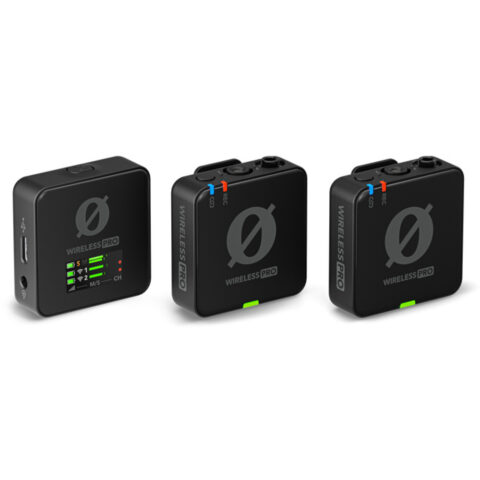
RODERODE Wireless PRO Compact Wireless Microphone System
$382.95 incl. GST Ships in 1-2 business daysAdd to cart -
 Hollyland
Hollyland LARK MAX 2 Combo 2-People Wireless Microphone System (Space Gray)
$405.95 incl. GST Ships in 4-6 weeksAdd to cart
On-board recording and 32-bit float wireless mics
The feature that separates these three from cheaper kits is recording inside the transmitter. If the wireless link drops, or a guest walks out of range, the transmitter still holds a clean copy. That backup is the main reason working videographers pay more for a 32-bit float wireless mic.
32-bit float files have so much headroom that a shout or a laugh that would clip a 24-bit recording can usually be pulled back in the edit. It does not fix a badly placed mic, wind noise or a clipped signal elsewhere in the chain, such as the camera's own input.
- DJI Mic 3: 32 GB per transmitter, with 24-bit or 32-bit float and a dual-file mode. DJI quotes about 43 hours of single-file 32-bit float, or 21.5 hours in dual-file mode.
- RODE Wireless PRO: 32 GB per transmitter in 32-bit float, which RODE rates at over 40 hours each. Files are managed in the RODE Central app.
- Hollyland Lark Max 2: 8 GB per transmitter according to Hollyland's manual, about 10 hours in 32-bit float or 14 hours in 24-bit. When full it records over the oldest files, so offload after each big day.
For a wedding that runs from ceremony to speeches, the Lark Max 2's 10 hours is workable but tight. The DJI and RODE have room for several jobs before you need to clear them. If you want a dedicated recorder as well, see our portable audio recorders and 32-bit float guide.
Battery life and charging cases
Battery is where the Lark Max 2 pulls ahead. Hollyland quotes about 11 hours per transmitter, about 12 hours for the camera receiver and up to 36 hours total with the case. DJI quotes 8 hours per transmitter, 10 for the receiver and up to 28 hours with the case. RODE rates the Wireless PRO at up to 7 hours for transmitters and receiver, with the case adding more than two full recharges.
In practice, seven hours covers most interview days and corporate shoots, but a long wedding or a festival day can stretch it. Every kit lets you drop the units back in the case during breaks, so the case matters as much as the internal cells. All three cases charge over USB-C.
Connecting to cameras and phones
Each receiver has a 3.5 mm analogue output for cameras and a USB-C digital output for computers, phones and some cameras. How they handle phones differs.
DJI Mic 3
The kit includes a USB-C phone adapter that clips onto the receiver. A DJI Mic 3 Lightning adapter is sold separately for older iPhones. The transmitters can also connect by Bluetooth, with no receiver, to supported DJI cameras: up to two transmitters on the Osmo Pocket 3, Osmo 360 and Osmo Action 5 Pro, and one on the Osmo Action 4. DJI also lists support for up to four transmitters on one receiver.
RODE Wireless PRO
RODE supplies cables for both USB-C and Lightning phones. With current firmware, the transmitters can connect straight to an iPhone over Bluetooth through the RODE Capture app, without the receiver. RODE advises against using the 3.5 mm and USB-C outputs at the same time, as some setups create a ground loop and digital noise. The receiver's 3.5 mm socket also works as a headphone output.
Hollyland Lark Max 2
The Combo kit includes both a camera receiver and a small USB-C receiver that plugs straight into a phone. The camera receiver's 3.5 mm output can carry audio for monitoring or timecode, so set it for the job at hand. Over USB, Hollyland supports 24-bit or 32-bit float output, but 32-bit only helps if your recording app accepts it.
If you mostly film on a phone, a smaller system may suit you better. Our guide to wireless mics for iPhone and Android covers the phone-first kits.
Which is best for interviews, weddings and run-and-gun
Interviews and corporate video
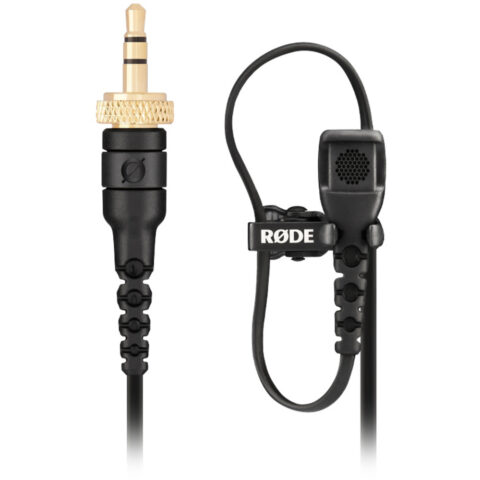
The RODE Wireless PRO suits sit-down interviews well because the kit includes two RODE Lavalier II mics, and hiding a lav under a collar usually sounds more natural than a transmitter on a lapel. GainAssist and the safety channel help when one guest speaks much louder than the other. All three transmitters accept a 3.5 mm lav, so you can add lavs to the DJI or Hollyland kits from our lavalier microphones range.
Weddings and events
Weddings reward battery life and backup recording. The Lark Max 2 has the longest runtime, while the DJI Mic 3 has four times the internal storage and the longest claimed range. For a groom at the altar with the camera at the back of a church, the DJI's range and dual-band link give you more margin. For a long day with few charging breaks, the Hollyland's 11 hour transmitters are the safer bet.
Run-and-gun and travel
The DJI Mic 3 transmitter weighs 16 g with its magnet and the Hollyland about 14 g, both light enough to clip on thin clothing. If you already shoot on an Osmo Pocket 3 or Osmo Action camera, the DJI's direct Bluetooth link removes the receiver from your kit entirely. The Lark Max 2 Combo covers a camera and a phone without extra adapters.
| If you mainly shoot | Consider | Why |
|---|---|---|
| Sit-down interviews, podcasts on camera | RODE Wireless PRO | Two Lavalier II mics included, GainAssist, safety channel |
| Long weddings and events | Hollyland Lark Max 2 or DJI Mic 3 | Longest battery (Hollyland) or more storage and range (DJI) |
| DJI Osmo cameras | DJI Mic 3 | Direct Bluetooth connection with no receiver |
| Camera and phone on the same job | Lark Max 2 Combo | Camera receiver and USB-C phone receiver in one kit |
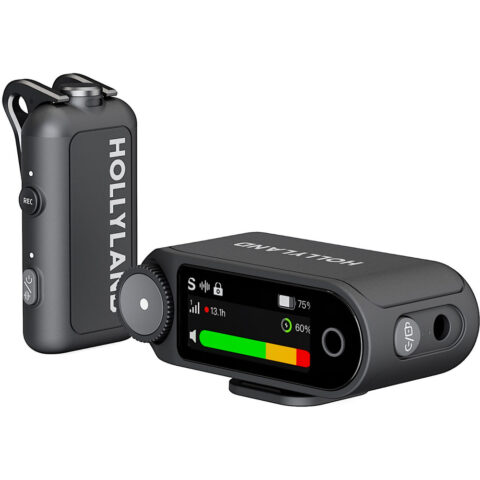
Other kits in the range include a larger Lark Max 2 bundle that adds Hollyland's OWS open-ear monitor earphones, and the Lark Max 2 Solo, a one-person camera kit. You can also add a spare DJI Mic 3 transmitter. See all kits from DJI, RODE and Hollyland.
Other kits and add-ons
-
 Hollyland
Hollyland LARK MAX 2 Solo Wireless Microphone System for Cameras (Space Gray)
$249.95 incl. GST Ships in 1-2 business daysAdd to cart -
 DJI
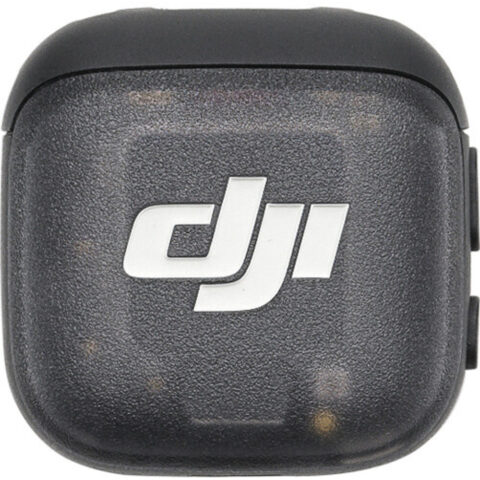
DJIDJI Mic 3 Transmitter
$153.95 incl. GST Ships in 2-3 business daysAdd to cart -
 DJI
DJIDJI Mic 3 Mobile Phone Adapter (Lightning)
$36.95 incl. GST Ships in 2-3 business daysAdd to cart -
 RODE
RODERode Lavalier II Omidirectional Premium Lavalier Microphone
$139.95 incl. GST Ships in 1-2 business daysAdd to cart
Buying tips before you order
- Check the kit name. Solo, Combo and larger bundle kits differ in receivers and accessories, and the DJI Mic 3 is also sold as separate transmitters and receivers.
- Plan for Lightning. If you still use a Lightning iPhone, confirm which adapter or cable you need before the shoot.
- Update firmware first. Features such as direct phone connection on the Wireless PRO depend on current firmware, installed through RODE Central on a computer.
- Test in the real room. A quick walk-around test at the venue tells you more about range than any spec sheet.
Prices include GST, shipping is free Australia-wide, and each product page shows its dispatch time.
Questions
Is the DJI Mic 3 better than the RODE Wireless PRO?
Neither is better for everyone. The DJI Mic 3 has a longer claimed range, dual-band 2.4 and 5.8 GHz transmission, slightly longer battery and a direct link to DJI Osmo cameras. The RODE Wireless PRO includes two Lavalier II mics, GainAssist with a safety channel, and mature app control through RODE Central. Choose based on your camera and accessories.
Do I need a licence to use these wireless mics in Australia?
No individual licence is needed. All three operate in shared bands that ACMA's low interference potential devices class licence covers, so compliant equipment can be used without registering or paying a fee. The trade-off is that these bands are shared with Wi-Fi and Bluetooth, so you get no protection from interference.
Can I record straight to my phone with these systems?
Yes. The DJI Mic 3 kit includes a USB-C phone adapter, with a Lightning adapter sold separately. The RODE Wireless PRO connects with supplied USB-C and Lightning cables, or directly to an iPhone over Bluetooth in the RODE Capture app. The Lark Max 2 Combo includes a plug-in USB-C phone receiver.
What does 32-bit float actually do for me?
It gives each transmitter's backup recording enough headroom that a sudden laugh or shout is very unlikely to clip, and quiet speech can be raised without adding much noise. It will not remove wind, rustle or a room echo, so good mic placement still matters. The files also take more storage than 24-bit.
Sources
Specifications and background were checked against these pages when the guide was last updated. Always confirm compatibility on the product page before ordering.
- dji.com/mic-3/specs
- dji.com/mic-3/faq
- rode.com/en-us/products/wireless-pro
- rode.com/en-us/user-guides/wireless-pro/getting-started
- rode.com/en-us/user-guides/wireless-pro/rode-capture
- hollyland.com/product/lark-max2
- download.hollyland.com/User_manual/LARK%20MAX%202/2%20Mic%20&%201%20RX/User%20Manual/LARK%20MAX%202%20-%20User%20Manual%20-%20English.pdf
- hollyland.com/support/faq/lark-max2
- acma.gov.au/wireless-microphones