Buying guide
Choosing a wireless microphone for iPhone and Android
How to pick a phone-first wireless mic kit, from the DJI Mic Mini 2 and RODE Wireless Micro to Hollyland Lark M2, M2S and A1, and how to connect it to USB-C and Lightning iPhones and Android.
Short answer For a wireless microphone for iPhone or Android, buy a kit whose receiver matches your phone's port: USB-C for iPhone 15 and later and most Android phones, Lightning for iPhone 14 and earlier. The DJI Mic Mini 2 has the longest battery and range on paper, the RODE Wireless Micro is the smallest and can link to an iPhone with no receiver, and the Hollyland Lark M2, M2S and A1 cover a wide spread of kit options. Always run a short test clip in the app you plan to post from.
Phone-first wireless kits are built for social video, vlogs and quick interviews. The receiver plugs straight into the phone, the transmitters clip to a shirt, and a charging case keeps everything topped up. Choosing a wireless microphone for iPhone or Android comes down to three things: the connector, how many people you need to mic, and whether you will ever plug it into a camera.
You can see every kit in our wireless microphone systems range. The specifications below come from DJI, RODE and Hollyland spec pages and manuals.
Lightning or USB-C microphone: check your phone first
Apple moved the iPhone to USB-C with the iPhone 15. The iPhone 14 and earlier use Lightning. Apple lists microphones among the accessories its USB-C iPhones support, and a receiver made for USB-C phones plugs in without adapters.
- iPhone 15, 16, 17 and later: buy the USB-C version.
- iPhone 14 and earlier: buy the Lightning version, or a USB-C kit plus the maker's own Lightning adapter.
- Android: buy the USB-C version. RODE, for example, lists Android 11 or later for the USB-C Wireless Micro.
- Both an old and a new phone: a kit with both connectors, such as the Hollyland Lark A1 USB-C and Lightning combo, saves buying twice.
The Lightning and USB-C versions are separate products, not one receiver with swappable plugs, so the Lightning RODE Wireless Micro will not work on an Android phone. A passive cable adapter is not a reliable workaround. Stick to the adapter the microphone maker sells for that receiver.
Phone-first wireless kits in this guide
-
 DJI
DJIDJI Mic Mini 2 Wireless Microphone System with Charging Case (2TX+ Mobile RX)
$114.95 incl. GST Ships in 4-6 weeksAdd to cart -
 RODE
RODERODE Wireless Micro Ultra-Compact Wireless Microphone (USB-C, Black)
$143.95 incl. GST Ships in 1-2 business daysAdd to cart -
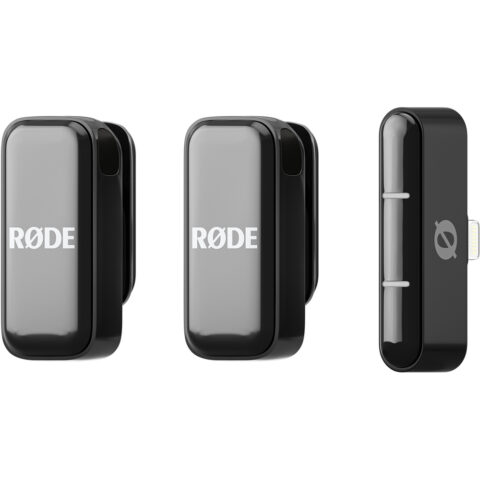 RODE
RODERODE Wireless Micro Ultra-Compact Wireless Microphone (Lightning, Black)
$143.95 incl. GST Ships in 1-2 business daysAdd to cart -
 Hollyland
Hollyland LARK M2S Duo USB-C Wireless Microphone System
$162.95 incl. GST Ships in 1-2 business daysAdd to cart
DJI Mic Mini 2 vs RODE Wireless Micro vs Hollyland Lark
| Feature | DJI Mic Mini 2 | RODE Wireless Micro | Hollyland Lark M2 | Hollyland Lark M2S | Hollyland Lark A1 |
|---|---|---|---|---|---|
| Claimed range | 400 m with camera receiver, 300 m with mobile receiver | Over 100 m | 300 m line of sight | See product page | See product page |
| Transmitter battery | Up to 11.5 hours | Up to 7 hours | About 10 hours | At least 9 hours (noise cancelling off) | About 9 hours |
| Total with case | Up to 48 hours | Up to 21 hours | Up to 40 hours | Up to 30 hours (Combo) | See product page |
| Transmitter weight | See product page | 12 g, 18 g with magnet | About 9 g | About 7 g | About 8 g |
| Phone connector | USB-C mobile receiver, Lightning adapter available | USB-C or Lightning versions | USB-C or Lightning mobile receivers | USB-C or Lightning mobile receivers | USB-C, Lightning or both |
| Noise reduction | Yes | See product page | ENC | ENC | Three-level intelligent noise cancellation |
| Camera option | Camera receiver kits | Camera Kit version | Camera and Combo kits | Combo kits | Mobile kits in this range |
DJI Mic Mini 2
The DJI Mic Mini 2 has the longest quoted runtime of the group: up to 11.5 hours per transmitter and up to 48 hours with the case. It comes in four main kits: two transmitters with a camera receiver and case, two transmitters with a mobile receiver and case, and one-transmitter versions of each. The transmitters can also link by Bluetooth, without a receiver, to supported DJI Osmo cameras such as the Osmo Pocket 3. DJI sells a USB-C to Lightning adapter for its mobile receiver.
RODE Wireless Micro
The RODE Wireless Micro is the smallest system here, with a 6 g receiver and a 61 g charging case. Its standout feature is the free RODE Capture app on iOS 16 or later, which can connect the transmitters to an iPhone over Bluetooth with no receiver at all. The trade-off is range and battery: over 100 m and up to 7 hours per transmitter. For cameras, choose the Wireless Micro Camera Kit, which adds a camera receiver.
Hollyland Lark M2, M2S and A1
Hollyland's three phone-friendly lines differ mainly in size, battery and noise handling. The Lark M2 has the longest battery of the three at about 10 hours per transmitter and up to 40 hours with the case, plus a 300 m line of sight range. The M2S has the lightest transmitter at about 7 g. The Lark A1 uses three-level intelligent noise cancellation and has a 5.9 g mobile receiver, and it is sold in USB-C, Lightning and dual-connector kits.
Hollyland sells Mobile versions with a plug-in phone receiver and Combo versions aimed at using one kit on both a camera and a phone. Check the contents on each product page before you order.
Hollyland Lark kits for phones
-
 Hollyland
Hollyland LARK A1 Duo 2-Person Wireless Microphone System with USB-C (Space Gray)
$79.95 incl. GST Ships in 4-6 weeksAdd to cart -
 Hollyland
Hollyland LARK A1 Combo 2-Person Wireless Microphone System with USB-C & Lightning (Space Gray)
$114.95 incl. GST Ships in 1-2 business daysAdd to cart -
 Hollyland
Hollyland LARK A1 Mini Duo 2-Person Wireless Microphone System with Lightning (Space Gray)
$71.95 incl. GST Ships in 1-2 business daysAdd to cart -
 Hollyland
Hollyland Lark M2 Wireless Microphone System (Combo)
$168.95 incl. GST Ships in 1-2 business daysAdd to cart
How to connect a wireless mic to iPhone and Android
USB-C iPhones (iPhone 15 onwards)
- Charge the kit and check that the transmitters are paired with the receiver.
- Plug the receiver into the iPhone's USB-C port and unlock the phone.
- Open the Camera app. It normally switches to the external mic automatically; there is no microphone menu to set.
- Record a short test while talking, then play it back on headphones. Tapping the transmitter lightly during the test confirms it is the source.
Lightning iPhones (iPhone 14 and earlier)
Use a kit with a Lightning receiver, or the microphone maker's own Lightning adapter. The steps are then the same as above. RODE's Wireless Micro also offers the receiver-free Bluetooth link through RODE Capture on supported iPhones.
Android phones
Most recent Android phones accept USB microphones through the USB Audio Class standard, but a USB-C socket alone does not prove a phone supports it. Plug in the receiver, unlock the phone and accept any USB prompt. On some models you need to turn on OTG or USB accessory support in Settings. Some Android camera apps keep using the built-in mic even with a receiver connected, so if the test clip sounds like the phone, try a camera or recorder app that lets you choose the audio input.
Camera apps, Instagram and TikTok
- Connect the receiver before you open Instagram or TikTok, then close and reopen the app if it ignores the mic.
- Turn off Bluetooth earbuds or speakers while recording, as they can grab the audio route.
- Record a private draft and check it before posting.
- If a social app will not use the mic, record in the phone's own camera app and upload the finished clip.
The receiver uses the phone's only port, so you usually cannot charge while recording unless your adapter has a pass-through charging socket. Start long sessions with a full phone battery.
Which wireless microphone for iPhone or Android suits you
| You want | Look at | Why |
|---|---|---|
| Longest runtime on a phone | DJI Mic Mini 2 with mobile receiver | Up to 11.5 hours per transmitter, 48 hours with case |
| Smallest kit, iPhone user | RODE Wireless Micro | 6 g receiver, receiver-free link in RODE Capture |
| Old Lightning phone and new USB-C phone | Hollyland Lark A1 USB-C and Lightning combo | Both connectors in one kit |
| Phone now, camera later | DJI Mic Mini 2 with camera receiver, RODE Wireless Micro Camera Kit or a Lark Combo | Camera receiver included |
| Street interviews | Any two-transmitter kit plus a handheld adapter | Hand the mic to guests |
For street interviews, RODE's Interview Micro handheld adapter turns a Wireless Micro transmitter into a handheld mic. For phone rigs, handles and mounts, see our vlogging and TikTok gear.
Camera-ready kits and adapters
-
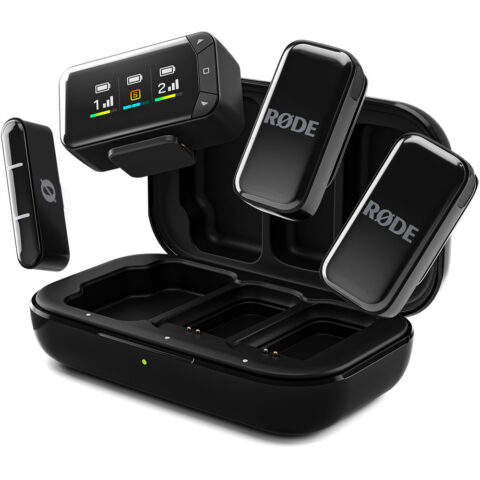 RODE
RODERode Wireless Micro Ultra-Compact Wireless Microphone Camera Kit
$202.95 incl. GST Ships in 2-4 weeksAdd to cart -
 DJI
DJIDJI Mic Mini 2 Wireless Microphone System with Charging Case (2TX+1RX)
$143.95 incl. GST Ships in 1-2 business daysAdd to cart -
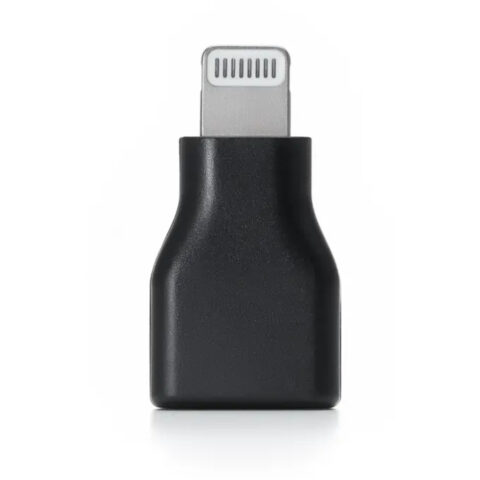 DJI
DJIDJI Mic Series Mobile Receiver Adapter (USB-C to Lightning)
$56.95 incl. GST Ships in 4-6 weeksAdd to cart
If you need on-board backup recording or timecode for paid work, step up to a flagship kit. Our DJI Mic 3 vs RODE Wireless PRO vs Lark Max 2 comparison covers those. Browse more from DJI, RODE and Hollyland. Prices include GST and shipping is free Australia-wide.
Questions
Does the iPhone Camera app use an external wireless mic?
Usually, yes. When iOS recognises a compatible USB-C or Lightning receiver, the built-in Camera app records from it automatically, with no setting to change. Always confirm with a short test clip played back on headphones, because some third-party and social apps handle external audio differently and may fall back to the phone's own microphones.
Will a USB-C wireless mic work on every Android phone?
Not every one. The phone must support USB audio input, and some models need OTG or USB accessory mode switched on. Some default camera apps also ignore external mics. RODE lists Android 11 or later for its USB-C Wireless Micro. Test your exact phone and app before an important shoot.
Can I use a phone wireless mic with a camera?
Only with the right receiver. Plug-in phone receivers are made for the phone's port, so buy a kit with a camera receiver, such as the DJI Mic Mini 2 with its camera receiver, the RODE Wireless Micro Camera Kit, or a Hollyland Combo kit. These give you a 3.5 mm output for the camera's mic input.
Is DJI Mic Mini 2 or RODE Wireless Micro the better pick?
It depends on your priorities. The DJI Mic Mini 2 quotes longer range and much longer battery, and links directly to supported DJI Osmo cameras. The RODE Wireless Micro is smaller and can connect to an iPhone with no receiver through the RODE Capture app. Android users should compare the USB-C versions of both.
Sources
Specifications and background were checked against these pages when the guide was last updated. Always confirm compatibility on the product page before ordering.
- support.apple.com/en-us/105099
- store.dji.com/uk/product/dji-mic-mini-2?site=brandsite&set_region=GB
- edge.rode.com/pdf/products/1465/Wireless%20Micro%20Datasheet_13b_FA.pdf
- rode.com/en-us/products/wireless-micro
- hollyland.com/product/lark-m2
- hollyland.com/product/lark-m2s
- hollyland.com/product/lark-a1
- store.hollyland.com/collections/microphones-for-android-phones